Next maintenance forecast
Flylogs estimates when each aircraft's next check will fall due, from its own flying history, and shows that estimate wherever the aircraft is about to be used.
The rule is the same everywhere:
If the shop has already booked the work — an open maintenance job with a date — Flylogs shows that date, tagged Scheduled.
If nothing is booked, Flylogs shows its own estimate, tagged Estimated.
An estimate is a suggestion, never a commitment. It never blocks a booking, never creates a conflict, and never stops a flight being saved.
Where you see it
Aircraft page. A card under the aircraft header with the predicted date, the job it refers to, and the likely window it will fall in. If the aircraft has already run past an interval the card turns red and reports how many hours it is over.
Schedule Manager calendar. Aircraft with no maintenance booked get a blue all‑day marker on their estimated date. It is a suggestion: you can book flights on that day exactly as before, and the marker will not raise a conflict. Aircraft that already have a job booked keep the amber block they have always had — nothing changes for them.
Schedules page. Under your upcoming flights, one line per aircraft you are booked on, so nobody turns up to a flight on an aircraft that is about to go into the shop.
Flight form. Below the maintenance hours bar, alongside the remaining‑hours gauge.
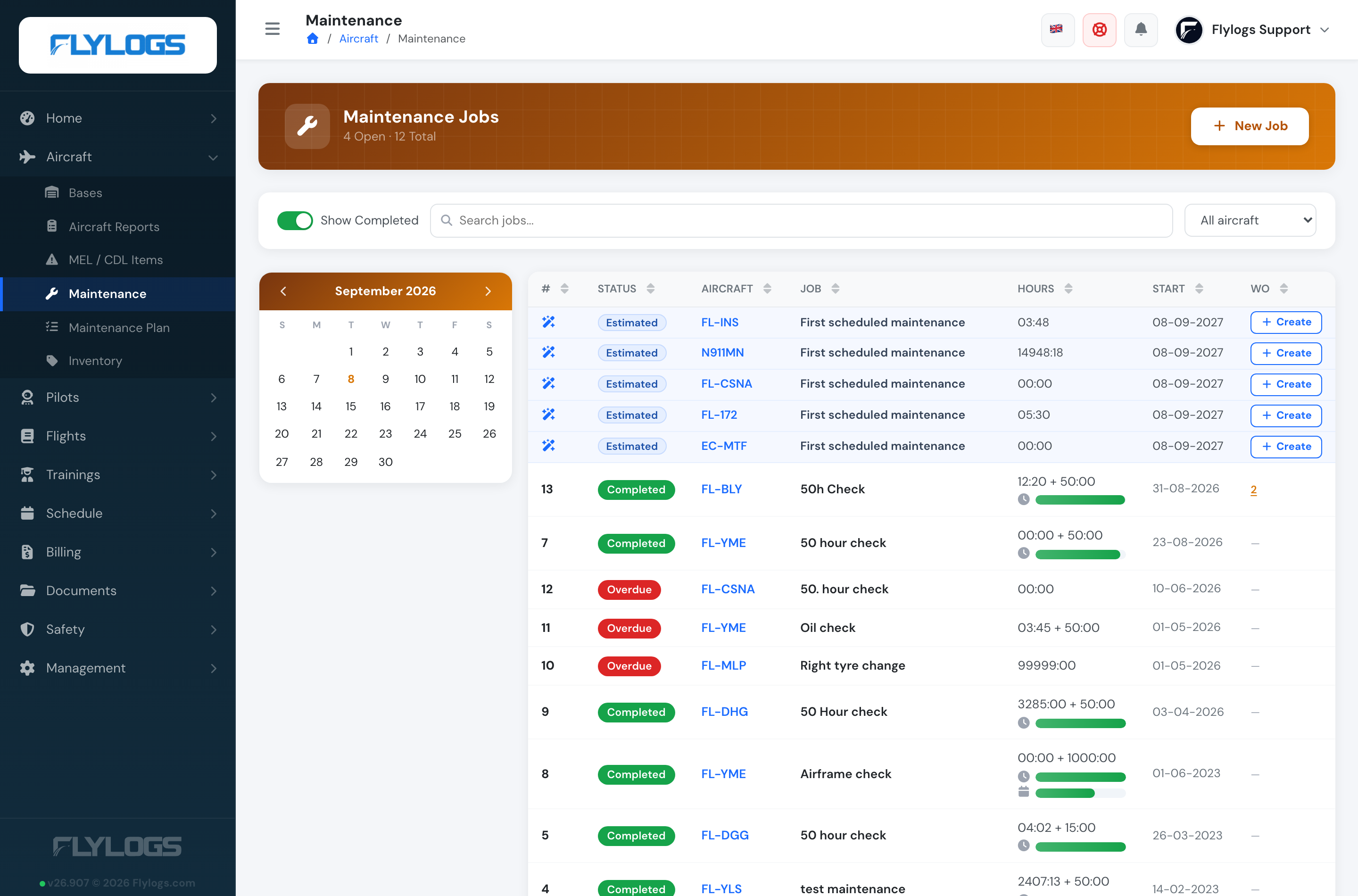
Maintenance jobs list. Aircraft with nothing booked get a suggestion row at the top of the list, on a light blue background with a ✨ icon and an Estimated badge, so it can never be mistaken for a scheduled job. The row names the check that is due — the plan action, or the check the aircraft repeats — and carries a Create button.

Only the five soonest are shown; if more aircraft have suggestions, a Show N more suggestions link opens the rest. They are never counted as jobs, never sorted into the list, and disappear for an aircraft as soon as it has a real job booked.
Turning a prediction into a job
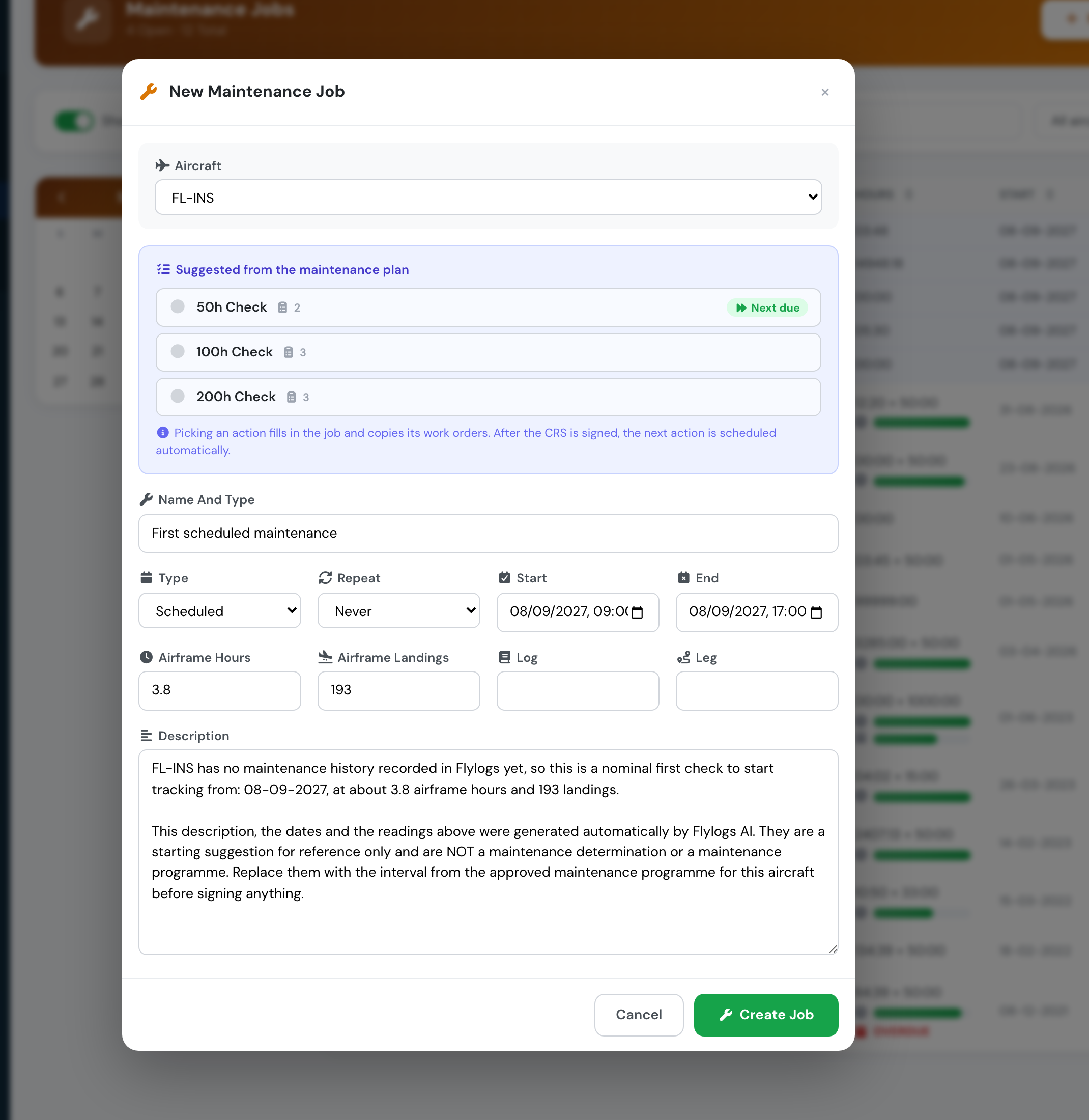
Create opens the ordinary new‑job form with the prediction already filled in:
Aircraft — the aircraft the row belongs to.
Name — the check that is actually due: the maintenance plan action when the aircraft is on a plan, otherwise the name of the check it repeats. Only an aircraft with no history at all falls back to a generic name.
Maintenance plan action — where the suggestion came from a plan, that action is already selected in the Suggested from the maintenance plan panel, so saving copies its work orders and links the job to the plan.
Start / End — a working day (09:00–17:00, company time) on the predicted date. If the aircraft is already overdue the form opens on today instead, because nobody schedules work in the past.
Airframe hours and landings — the readings the aircraft is expected to have on that date, not the readings it has today.
Description — a written explanation of where the estimate came from, stating plainly that it was generated by Flylogs AI and is for reference only.

That last point about the readings matters. A job carries the airframe reading it was raised at, and the next interval is measured from there. Prefilling today's counter would start the following cycle short by everything the aircraft flies between now and the check. So for an hours‑driven check the form is filled with the reading the check falls due at; for a calendar or landings check the reading is flown forward at the aircraft's blended rate.
Everything is editable before you save. Nothing is created until you press Create job, and the suggestion row stays until a real job exists.
How the estimate is calculated
Where the aircraft is on a maintenance plan, the interval comes from the plan (see below). Otherwise Flylogs takes the interval recorded when the last check of that type was signed off (the airframe reading at the time, plus the validity interval), and works out how long the remaining hours will take to fly.
The utilisation rate blends the last 90 days and the last 12 months of flying, counting every calendar day — including days the aircraft did not fly, because grounded days are part of how long an interval really takes to burn.
Blending the two windows is what makes the estimate survive a quiet season. A school that barely flies in August would, on a short window alone, look like it needs no maintenance until winter. The 12‑month half of the blend always contains one August, so the quiet month is accounted for rather than mistaken for the new normal.
The estimate also takes the earliest of everything that can fall due — airframe hours, landings, and any calendar expiry recorded on the job — so a check that comes due on landings before it comes due on hours is the one you are shown.
When the aircraft is on a maintenance plan
If the aircraft is attached to a maintenance plan, the plan carries the interval and the job card is only the record that the work was done. Flylogs anchors each plan action to the last time it was completed and counts forward from there:
Hours interval → due at that job's airframe reading plus the interval.
Landings interval → due at that job's landings plus the interval.
Repeat (daily, weekly, monthly, quarterly, semesterly, yearly) → due one period after the work was done.
A plan action can carry all three at once, and the forecast takes whichever arrives first.
This matters most for aircraft that are not driven by flight hours at all. A simulator on a monthly plan is due a month after the last one was signed off, however much or little it has been used — so a simulator last done on 18 May is due on 18 June, and if that has passed it is reported as overdue and the suggested job opens dated today.
Plans take precedence over the job card for the checks they own, and only for those. An aircraft on an annual plan that also runs 50‑hour checks recorded as ordinary jobs keeps both: the annual comes from the plan, the 50‑hour from the job history.
Jobs created before plans existed usually carry no link back to one, so Flylogs also matches a plan to its jobs by name. Naming a job exactly as its plan action is what keeps the chain intact — which is why a job created from a suggestion is named after the plan action rather than after the prediction, and arrives with that action already selected.
An aircraft with no maintenance history
A company that has never recorded a maintenance job still gets a suggestion for every aircraft it has — otherwise there would be nothing to look at, which is exactly backwards for the operation that has yet to start tracking.
In that case Flylogs offers a nominal first check, whichever of these arrives soonest:
the next 50 flight hours,
the next 50 sectors, or
12 months from today, if the aircraft has no recent flying to project from.
These rows say First scheduled maintenance and are labelled No maintenance history — suggested starting point. They are a starting point for tracking, not a maintenance programme: replace the interval with the one from the aircraft's approved programme before you rely on it. Once a real job has been signed off with an interval, the estimate switches to that aircraft's actual history and the nominal figures disappear.
The likely window
Alongside the date, Flylogs shows a range, e.g. Likely between 19 Sep and 29 Oct. That range is calibrated against the company's own history rather than assumed: measured across several years of real fleet data, the true date falls inside the range roughly 8 times out of 10.
Use the date to plan, and the range to judge how firm that plan is. A narrow range means a steady, predictable aircraft; a wide one means utilisation has been uneven and the check could land noticeably earlier or later.
What it does not know
Calendar‑only items that are not recorded on a maintenance job — the ARC, the annual, life‑limited parts — are not part of the hours estimate and can fall earlier. Record them as a job with an expiry date and they will be taken into account.
A stale record. If nobody has signed off a check for a long time while the aircraft kept flying, Flylogs reports the aircraft as overdue, because that is what the data says. That is usually a sign the jobs stopped being recorded rather than that the aircraft is unairworthy — but it is worth checking either way.
Long‑life items without a maintenance plan. If an engine TBO or hot‑section is recorded as an ordinary job with no maintenance plan attached, a later routine sign‑off supersedes it, and it will not be offered as the next due item until the routine check passes it. Attaching those items to a maintenance plan keeps them tracked as their own cycle.
It is AI-generated, and it says so
The estimate is produced automatically from utilisation data. Any job you create from one arrives with that stated in its description, so the next person to open the job card knows the dates and readings were suggested rather than determined.
Nothing here replaces your approved maintenance programme. It is a planning aid: the authority on when an aircraft is due remains the job card and the CRS. Check a suggested job against the approved programme and the actual airframe readings, and correct it, before you sign anything against it.
Who can see it
The forecast needs a Club, Premium or Unlimited subscription, like the rest of the maintenance section.
Within that, it follows the visibility of the page it appears on: the aircraft page and the flight form show it to any user who can see the aircraft's maintenance information (Flight Instructor and above, plus Auditors and Mechanics), the Schedules page shows it for the aircraft you are personally booked on, and the blue calendar markers appear on the Schedule Manager page, which is limited to schedule managers.
The suggestion rows and the Create button on the jobs list appear only for the roles that may create maintenance jobs — Company Administrators, Operations Managers, Compliance & Safety Managers and Mechanics — or the aircraft's owner. Everyone else sees the list exactly as before.
Last updated