> For the complete documentation index, see [llms.txt](https://docs.flylogs.com/fcom/llms.txt). Markdown versions of documentation pages are available by appending `.md` to page URLs; this page is available as [Markdown](https://docs.flylogs.com/fcom/whats-new/whats-new/certificate-preview-and-withdrawal.md).

# Certificate preview and withdrawal

**September 2026** · Training courses

A course completion certificate is frozen the moment it is issued — that is the point of it, and it is not changing. What has changed is everything around that moment: you can now **see the document before it counts**, **correct one that went out wrong**, and **withdraw one entirely** without destroying the record.

***

### Why we built it

A school issued two certificates on the same course, a day apart, with consecutive numbers. The first was signed by one account with the position printed blank; the second by a different account, as Head of Training. Nothing about the course or the students had changed between them — the signer setting had been corrected in the meantime, and the first certificate had already frozen the old value.

The first download *was* the issue. There was no way to look first, and no way to fix it afterwards. A document certifying completion of an approved course, carrying the wrong signatory and a blank position, was permanent in that school's register.

***

### Preview before the number counts

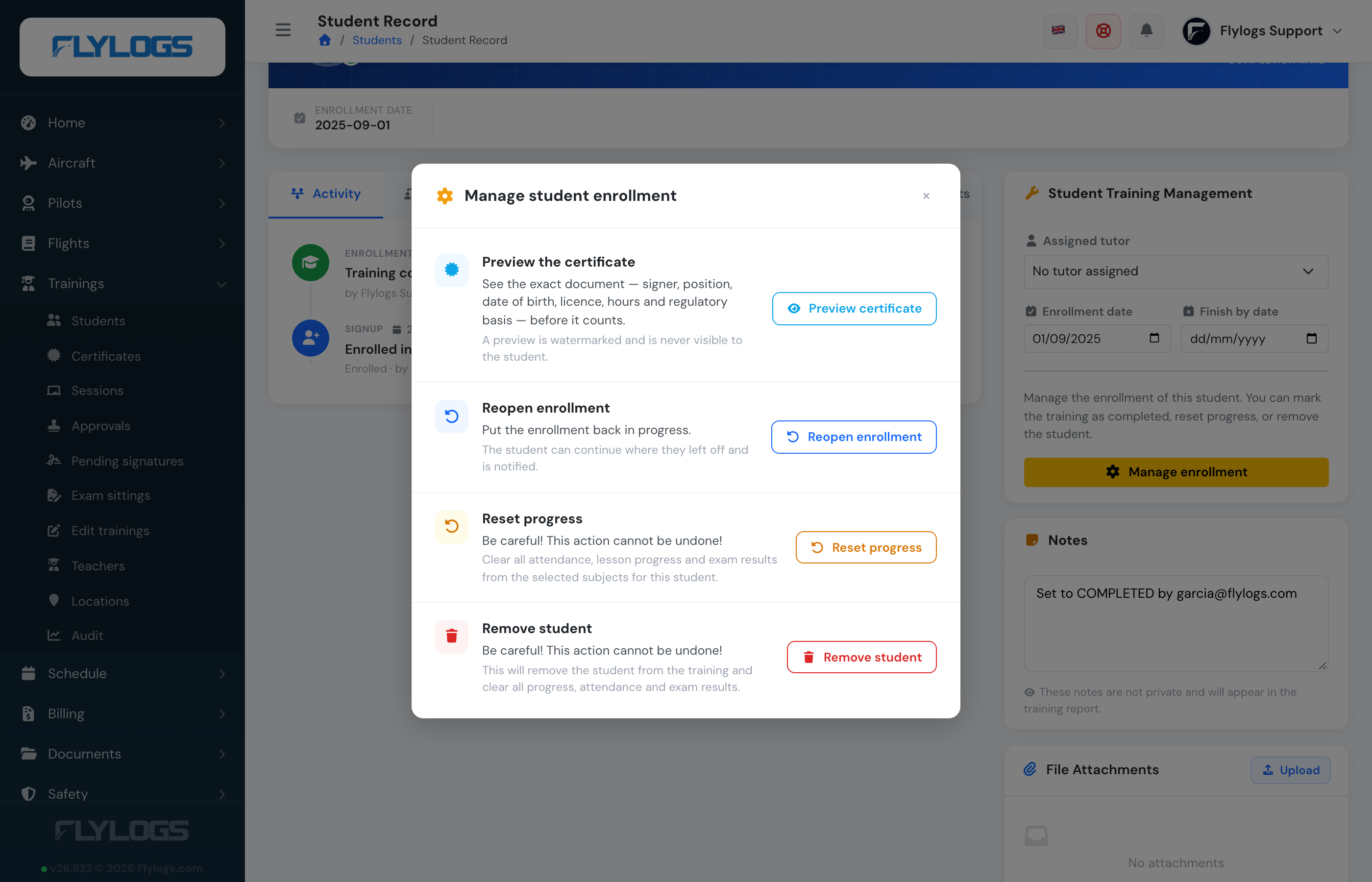
On a completed enrollment, open **Manage enrollment** and choose **Preview certificate**.

<figure><img src="https://3907986352-files.gitbook.io/~/files/v0/b/gitbook-x-prod.appspot.com/o/spaces%2FMT7uFw9SCqEw2vqrAnQg%2Fuploads%2Fgit-blob-776cccfd050e1444adad0acf34fd195087a8589f%2FtrainingsCertificatePreviewAction.png?alt=media" alt="The Manage enrollment window with Preview certificate as the first action"><figcaption><p>The first thing the window offers on a completed enrollment.</p></figcaption></figure>

You get the real document — signer, position, date of birth, licence, hours, regulatory basis, the whole organisation block — watermarked, with no date of issue and a line saying it has no validity.

<figure><img src="https://3907986352-files.gitbook.io/~/files/v0/b/gitbook-x-prod.appspot.com/o/spaces%2FMT7uFw9SCqEw2vqrAnQg%2Fuploads%2Fgit-blob-ebc142067f110765a8fa170d135d7c15ab038582%2FtrainingsCertificatePreviewPdf.png?alt=media" alt="A certificate with a large diagonal PREVIEW — NOT ISSUED watermark"><figcaption><p>Nothing about this can be mistaken for the issued document.</p></figcaption></figure>

**The student never sees a preview.** It does not appear on their training page, and the download is refused to them outright — not merely hidden.

When it is right, press **Issue certificate**. It keeps the number the preview already reserved, so issuing renumbers nothing.

> **Distance courses that finish on their own are unaffected.** A student who completes without anyone in the office involved still downloads a normal certificate, exactly as before. A preview only exists because a manager asked for one.

***

### A status on every certificate

**Trainings → Certificates** now shows what state each document is in, with a filter to match.

<figure><img src="https://3907986352-files.gitbook.io/~/files/v0/b/gitbook-x-prod.appspot.com/o/spaces%2FMT7uFw9SCqEw2vqrAnQg%2Fuploads%2Fgit-blob-6e0886a63495bd02252a41aa47995e169b0731e8%2FtrainingsCertificatesRegister.png?alt=media" alt="The certificates register with Modified, Preview, Revoked and Live statuses"><figcaption><p>Four certificates, four states, each with the date and account behind a change.</p></figcaption></figure>

**Preview** is waiting to be issued. **Live** is issued and untouched. **Modified** was issued and then corrected — it behaves exactly like Live for the student, and the label is there for your staff. **Revoked** has been withdrawn.

***

### Correcting a certificate that went out wrong

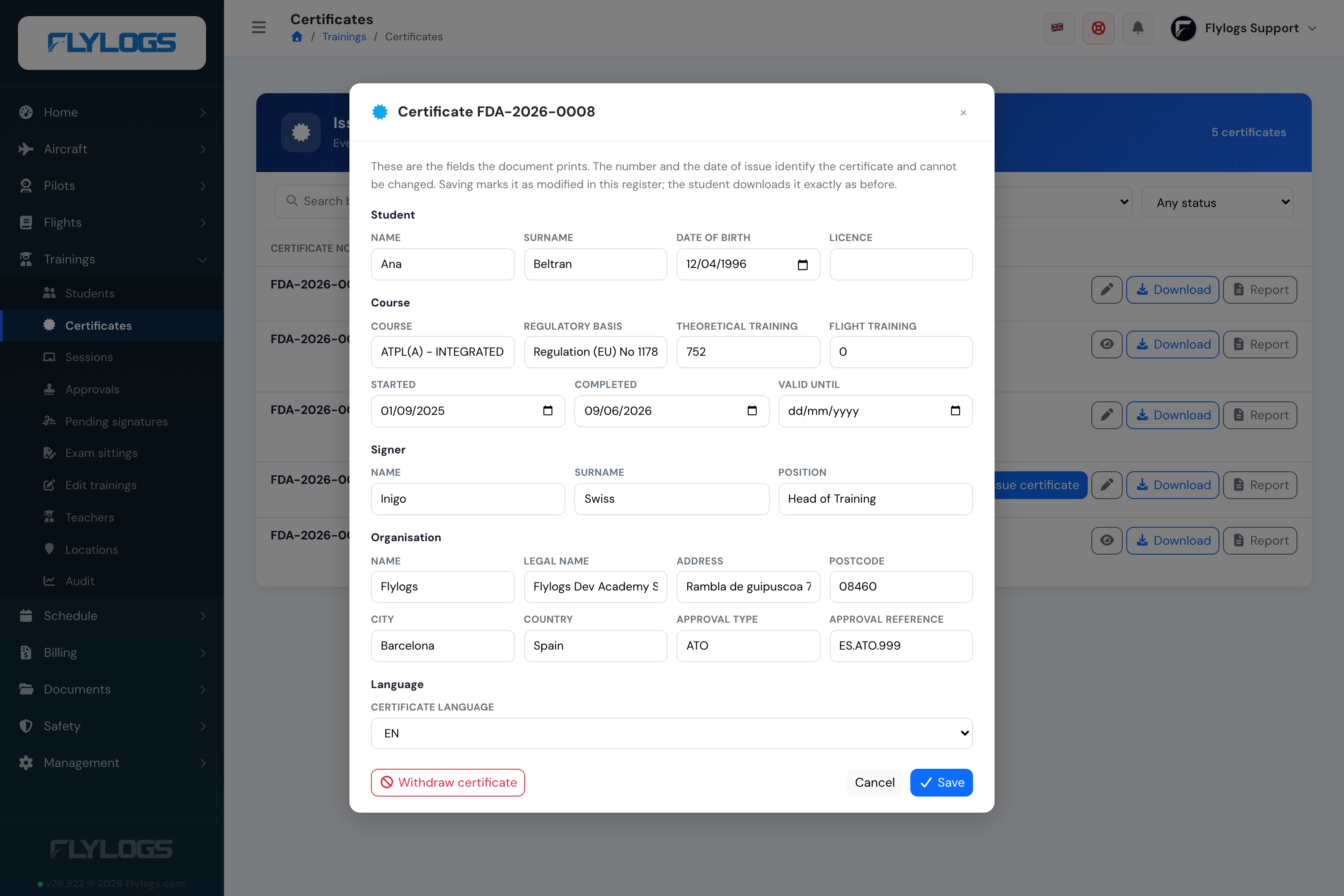
The pencil on a row opens every field the document prints: the student's name, date of birth and licence; the course name, regulatory basis, hours and the three dates; the signer's name and position; the organisation block; and the certificate language.

<figure><img src="https://3907986352-files.gitbook.io/~/files/v0/b/gitbook-x-prod.appspot.com/o/spaces%2FMT7uFw9SCqEw2vqrAnQg%2Fuploads%2Fgit-blob-c10b8d6fdb1b14d0a667f9a8a6c69c39bd16d0e0%2FtrainingsCertificateEdit.png?alt=media" alt="The certificate edit window"><figcaption><p>Everything the certificate prints, except what identifies it.</p></figcaption></figure>

The number, the sequence and the date of issue stay put — a certificate already in a student's file has to keep them. The certificate becomes **Modified**, and who changed it and when is on the record. Students download it the same way, under the same number.

***

### Withdrawing, without erasing

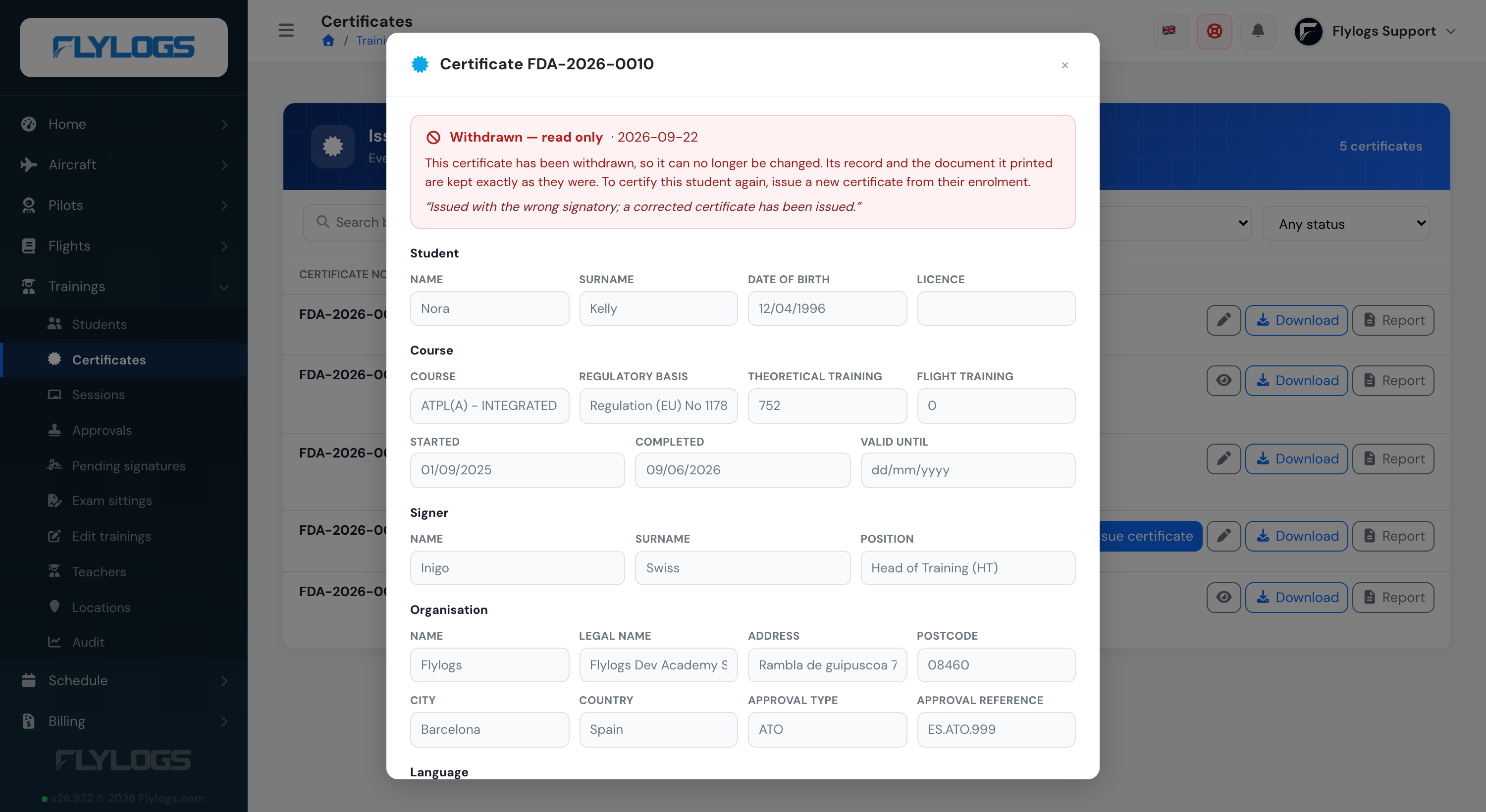
Withdrawing asks for a reason and records it with the date and your account. It **never deletes** the record or the frozen document: the register has to keep showing that the number existed and was withdrawn.

The student loses the download. Your staff keep it, printed like this:

<figure><img src="https://3907986352-files.gitbook.io/~/files/v0/b/gitbook-x-prod.appspot.com/o/spaces%2FMT7uFw9SCqEw2vqrAnQg%2Fuploads%2Fgit-blob-49a44bc804dba3682012c1803543a46a7e21b532%2FtrainingsCertificateRevokedPdf.png?alt=media" alt="A certificate with a red REVOKED watermark struck through the page"><figcaption><p>A withdrawn certificate as a manager downloads it, with the withdrawal date at the foot.</p></figcaption></figure>

A withdrawn certificate is a closed record, so it can no longer be edited — opening it shows the details read-only, with the reason it was withdrawn.

<figure><img src="https://3907986352-files.gitbook.io/~/files/v0/b/gitbook-x-prod.appspot.com/o/spaces%2FMT7uFw9SCqEw2vqrAnQg%2Fuploads%2Fgit-blob-90a93b9b548222e642fb2d33fba2502ab1c20fc3%2FtrainingsCertificateRevokedReadOnly.png?alt=media" alt="A withdrawn certificate opened read-only"><figcaption><p>Readable, not editable. To certify the student again, issue a new certificate.</p></figcaption></figure>

***

### The QR code tells the truth now

The verification page behind the certificate's QR code used to confirm the number and the completion status and nothing else — so a withdrawn certificate would have gone on verifying as genuine, permanently. It now states the certificate's status, without a login.

<figure><img src="https://3907986352-files.gitbook.io/~/files/v0/b/gitbook-x-prod.appspot.com/o/spaces%2FMT7uFw9SCqEw2vqrAnQg%2Fuploads%2Fgit-blob-67ac1fae9a7b3244795480a9f9006314db479c10%2FtrainingsCertificateVerifyRevoked.png?alt=media" alt="The public verification page showing a withdrawn certificate"><figcaption><p>Scanning a withdrawn certificate says so, in plain words.</p></figcaption></figure>

A certificate still in **Preview** shows no number here at all — it has not been issued, so there is nothing to confirm.

***

### Who can do what

Issuing, correcting and withdrawing are **company managers** only. The register stays readable by instructors (`Flight Instructor` and above), who can search and download, but see no pencil and no *Issue* button.

Full detail in [Student management](/fcom/training-courses/student-management.md#the-course-completion-certificate), and the endpoints in the [Trainings API](/fcom/api/trainings.md#certificate-lifecycle-manager).