

Manager tools
Company managers have access to extra data on top of the regular document view, designed to help track who has read each document and to audit compliance with company publications.
Manager tools are available to users in group level 150 or lower (administrators and managers). Pilots and other regular members do not see them.
Download registry
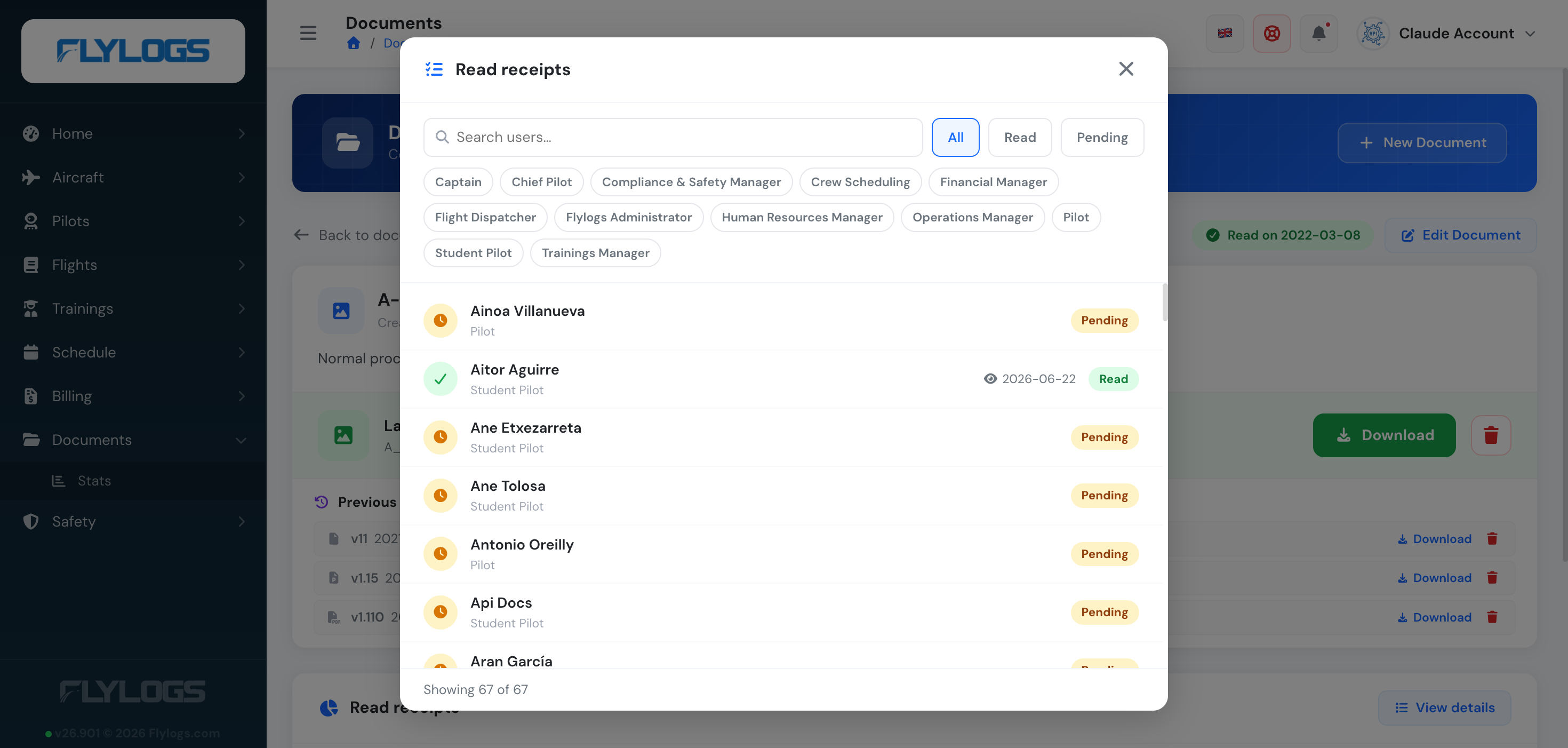
Section titled “Download registry”For each document, managers can see the full read history of the current version — filterable by name and by user group, and split into Read vs Pending — including:
- User name and group
- Read date
Re-downloads by the same user are not duplicated — the registry reflects unique readers per version, which is the figure that matters for compliance.
Pending users
Section titled “Pending users”Together with the download list, the view page shows a Pending users list — authorized users who have not yet downloaded the current version. The list is built from the document’s authorized user groups minus the users that already downloaded, excluding inactive and deleted accounts.
This is the easiest way to chase the few crew members that still need to read a critical publication.
Version reset
Section titled “Version reset”Publishing a new version clears the download registry and the comments for that document. From that moment, the Pending users list shows every authorized user again and the cycle restarts.
This guarantees that “downloaded” always refers to the current publication, never to an older one.
Cross-company visibility
Section titled “Cross-company visibility”Because manager tools are tied to the company scope, managers see download data only for documents owned by their own company. There is no cross-company visibility, even for users that belong to multiple companies.
Looking for the company-wide compliance dashboard across all documents? See Document Stats.