

New: see what your aircraft hours follow
November 2026 · Fleet & Maintenance
The aircraft page now shows which clock counts the aircraft’s hours, right next to the total. Flylogs also tells you when a Hobbs reading was not used, and why.
Hours counted from
Section titled “Hours counted from”Hours counted from now sits beside Total Hours. It shows flight time, block time, tach time or Hobbs time. An aircraft can record a Hobbs reading on every flight while its hours follow block time, and now you can see that at a glance.

Hours counted from, next to the total.
A warning when a Hobbs reading is not used
Section titled “A warning when a Hobbs reading is not used”On an aircraft counted on Hobbs time, a reading lower than the recorded hours is not used, so a mistyped value cannot wind the hours back. Until now this happened without any message.
The flight now shows a warning triangle in the aircraft logbook and an explanation on the flight page. It gives the reading, what the flight added instead, and how to correct it.
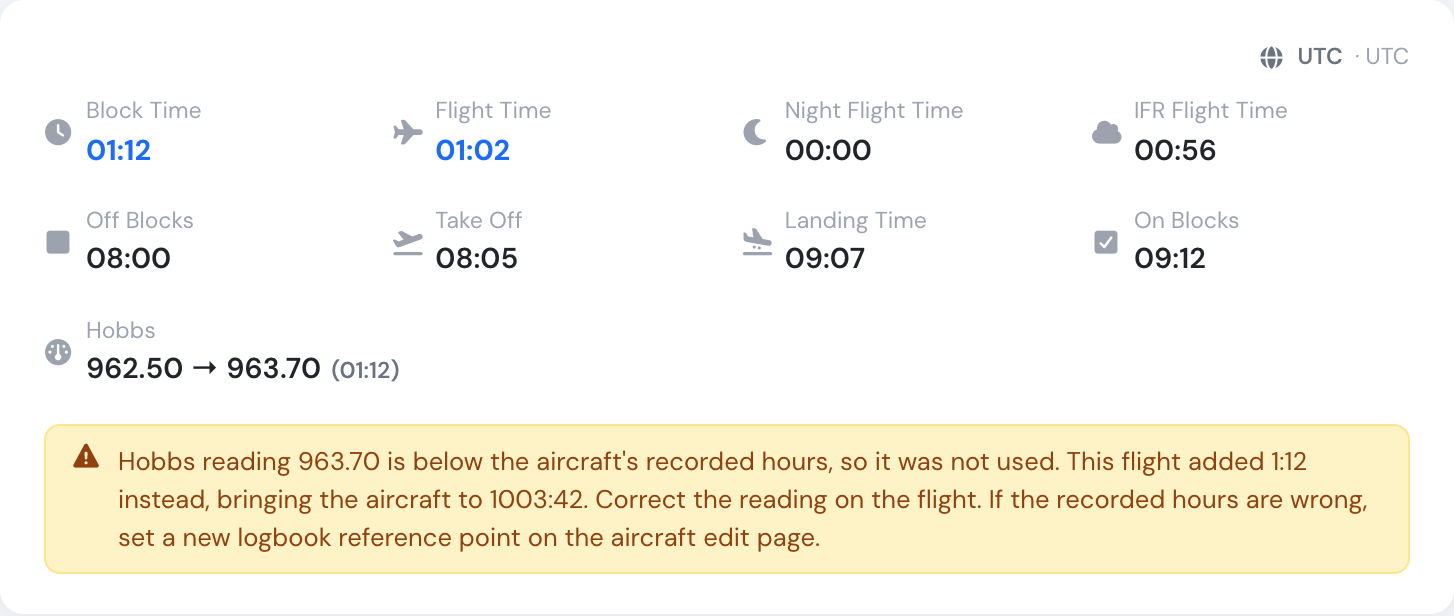
The explanation on the flight page.
Everyone who can open the aircraft or the flight sees both. Nothing is recalculated: the warning only explains what is already in the logbook.
See Aircraft logbook for the full reference, including how to make an aircraft’s hours follow its meter.