
New: Findings without an audit, and raised from a safety report
November 2026 · Safety
Every compliance finding now has one register, whatever found it. A finding no longer needs an audit, each finding records where it came from, and a finding can be raised straight from a safety report or moved to another audit.
Why we built it
Section titled “Why we built it”Findings could only be recorded on an audit. A non-compliance found while investigating an occurrence, during a management review or in the authority’s correspondence had to be filed against an audit it did not come from, or kept outside Flylogs. Neither gives the compliance monitoring manager one list of open findings to follow up and report on.
How it works
Section titled “How it works”- No audit. On the new-finding form choose No audit and say where the finding came from. It gets a classification, an owner, due dates and corrective actions like any other finding, and is numbered in the company series FN-YYYY-NNN.
- A source on every finding. Audit, Safety report, Management review, Authority correspondence or Other, with an optional reference such as the report number or the authority’s letter. The findings list shows it in the Audit / source column and can be filtered by it.
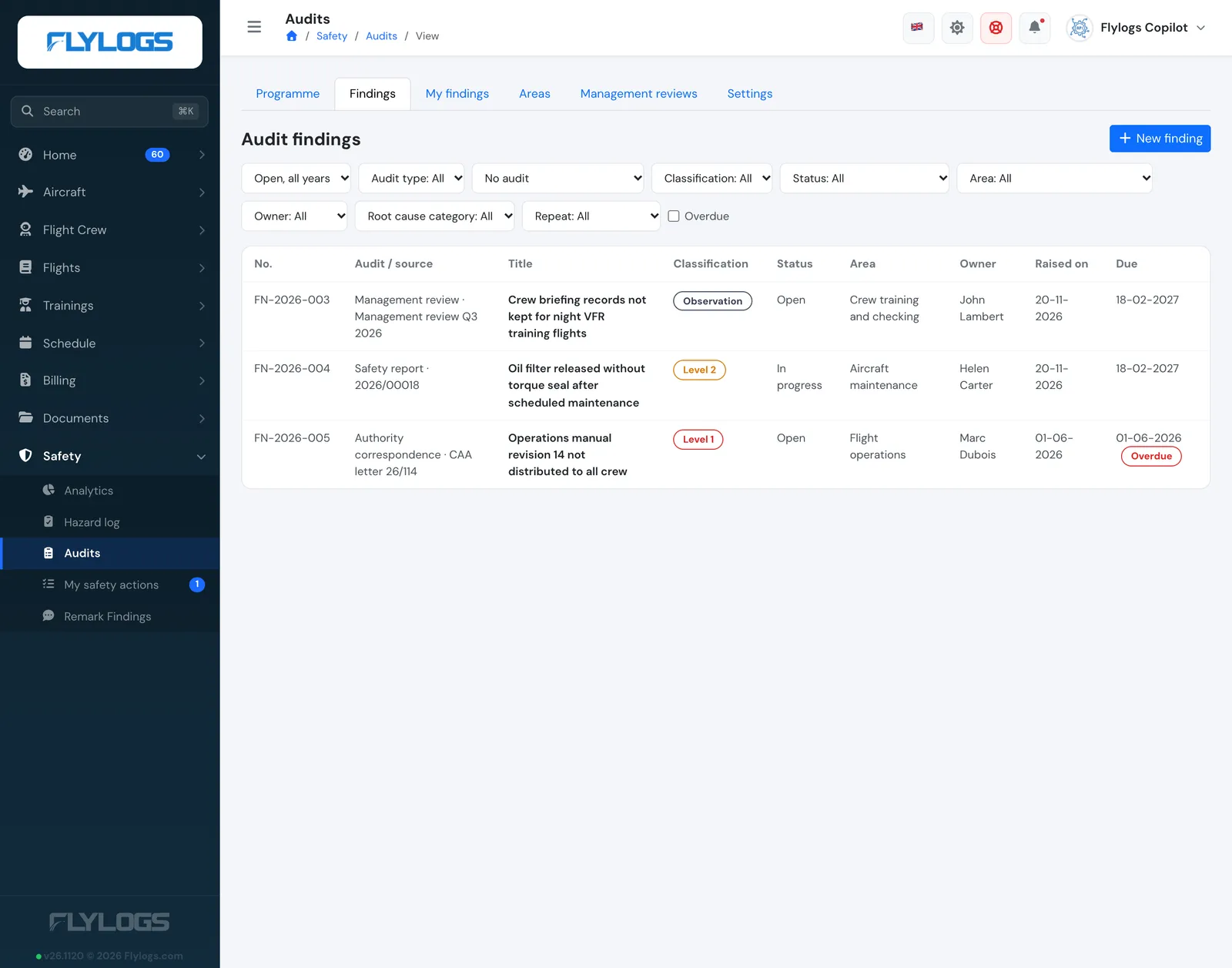
Findings from an audit, a management review, a safety report and the authority in one list.
- Raise finding from a safety report. On a submitted report, Manage > Raise finding opens the form with the report as the source, and the report is linked to the finding. The report’s new Compliance findings box lists the findings raised from it.

The Compliance findings box on a safety report.
- Move a finding to another audit. Edit the finding and choose another audit, or No audit. The finding takes the next number of its new series and the history keeps the old one.
- Counted everywhere. These findings count in their area’s open findings and appear in the management report, the reminders, the Safety Assurance dashboard and All safety actions. They are internal: authority statuses and decisions stay with the findings of an authority audit.
Available to managers on the Premium and Unlimited plans. Auditors keep working on the findings of the audits they conduct. In the API, audit_id is optional on audit_findings/add.json, with the new source, source_ref and safety_report_id fields.